

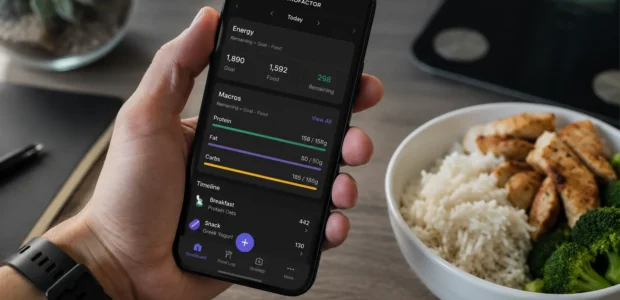

Most calorie tracking apps work the same way. You punch in your height, weight, age, and activity level, the app spits out a number, and you’re expected to trust that number for weeks or months at a time. MacroFactor takes a genuinely different approach, and it’s the reason this particular app keeps coming up whenever serious dieters compare notes. This MacroFactor review looks at exactly what sets it apart, who it’s actually built for, and where it falls a bit short.
What Is MacroFactor?
MacroFactor is positioned specifically as a macrofactor macro tracker for people already comfortable with the fundamentals of calorie and macro counting, not really a beginner friendly starting point. It’s built around one central idea, that your calorie needs shouldn’t be calculated once and left untouched, they should adjust as your body actually responds to what you’re eating.
The app was built by the team behind Stronger By Science, a well regarded, evidence based fitness publication known for translating research into practical advice. It launched in 2021 and has steadily built a reputation among people who take their nutrition tracking seriously.
The Adaptive TDEE Algorithm: What Actually Makes It Different
Here’s the feature that explains almost everything else about this app. Instead of calculating your calorie needs once using a static formula and leaving that number untouched, MacroFactor treats your expenditure as a moving target that shifts over time.
In practice, the app combines your logged food intake with your daily weight trend, then recalculates your actual calorie burn on a rolling basis, adjusting your targets accordingly as new data comes in. This matters because static formulas can be off by hundreds of calories depending on the person, and they completely miss metabolic adaptation, the way your body’s calorie needs shift during a long diet. MacroFactor corrects for both of these automatically, rather than asking you to guess and adjust manually.
Logging Experience and Everyday Use
Day to day, the app feels clean and refreshingly free of clutter. There’s no social feed, no promotional banners, no ads interrupting your logging flow, just a straightforward interface built around actually tracking your food. The barcode scanner works reliably, and food search tends to surface recently logged items quickly.
The one tradeoff worth mentioning is database size, it’s somewhat smaller than some competitors, which occasionally means substituting a similar food entry rather than finding an exact match. Daily weigh ins are also recommended for the algorithm to work at its best, since more consistent data simply leads to more accurate target adjustments over time.
The Analytics Dashboard
This is where MacroFactor really separates itself from a basic calorie counter. Your weight trend gets smoothed out to remove the day to day noise that comes from water retention, sodium intake, or just normal fluctuation. Alongside that, you can see your expenditure trend, your adherence rate, and your average intake, all displayed together so you can actually see whether your current deficit or surplus is producing the result you’d expect.
For anyone who’s spent weeks eating at what they thought was a deficit, wondering why the scale refuses to move, this dashboard tends to provide a much clearer answer than simply staring at a single calorie number ever could.
Who MacroFactor Is Actually Built For
This app fits best for intermediate to advanced lifters, data driven dieters who like treating their nutrition analytically, and anyone who’s stalled out using a fixed calorie app because it never accounted for their changing metabolism. If that sounds like you, the adaptive coaching genuinely delivers on its promise.
It’s a weaker fit for total beginners who haven’t built consistent logging habits yet, since the algorithm needs real data to learn from before it becomes useful. It’s also not the right choice if detailed micronutrient tracking, vitamins, minerals, and the like, is your main priority, since that’s simply not where this app focuses its attention.
Pricing and the Subscription Only Model
MacroFactor doesn’t offer a free tier, and the company has been upfront that this is a deliberate choice, meant to keep the app’s incentives aligned with users rather than advertisers. What you do get is a 7 day free trial with full access to every feature, so you can test the adaptive algorithm before committing any money.
Once the trial ends, pricing breaks down into three options, $11.99 billed monthly, $47.99 billed every six months, which works out to about $8 a month, or $71.99 billed annually, bringing the effective cost down to roughly $6 a month.
The annual plan is clearly the better deal if you’re planning to stick with it, since paying monthly for a full year adds up to $143.88, nearly double the cost of the yearly option. MacroFactor also offers a companion app called MacroFactor Workouts, and bundling both apps together runs $89.99 a year, just $18 more than subscribing to the nutrition app alone.
The value proposition here is straightforward, for people who use it consistently, the app replaces at least some of what a human nutrition coach would otherwise charge for. If cost is a concern, it’s worth checking Stay Fit Deals before subscribing, since the site regularly features for MacroFactor promo codes and discounts alongside other fitness and nutrition brands, making it easier to try the app without paying full price right away.
Is It Worth It?
Across most macrofactor reviews, including this one, the honest verdict lands in a similar place. For serious, consistent trackers who’ve hit a real plateau using static calorie apps, yes, it’s genuinely worth it. For casual users or complete beginners still building the logging habit, the value is a lot less clear cut, and a simpler, free option might make more sense until that habit sticks.
The Bottom Line
What actually makes this macrofactor calories tracker different isn’t flashy design or a long list of features, it’s the willingness to treat your metabolism as something that changes over time rather than a fixed number calculated once and forgotten. If you’re ready to log consistently and want targets built from your real, personal data instead of a generic formula, this is genuinely one of the more thoughtfully built tools available right now.